Best Free Calorie Tracking Apps With a Barcode Scanner
Compare free barcode scanning in Cronometer, MyNetDiary and Helthy, see which apps require payment, and learn how to log the right serving size.
The Helthy team · · 5 min read

Helthy, Cronometer and MyNetDiary offer unlimited barcode scanning on their free plans. Helthy combines food and workout logging. Cronometer includes detailed vitamin and mineral tracking. MyNetDiary offers an ad-free food diary. See Cronometer's plan details and MyNetDiary's free features for their inclusions.
The deciding factor is whether the app recognizes the foods you buy and lets you adjust portions easily. A free scanner helps with packaged food, but you still need to check the result against the label.
Which calorie apps include free barcode scanning?
We checked competitors' published plans on October 15, 2026. This comparison covers scanner access and plan limits, alongside Helthy's current free features. We haven't run a controlled test of their food databases or scanning accuracy.
| App | Barcode scanning on the free plan | Main consideration |
|---|---|---|
| Helthy | Unlimited | Free food and workout logging. Only photo scans count toward the scan allowance |
| Cronometer | Unlimited | Free nutrition reports cover a seven-day window |
| MyNetDiary | Unlimited | Free calorie and macro tracking without ads |
| MyFitnessPal | Premium feature | Scanning requires a paid plan under its published terms |
| Lose It! | Current membership page lists it under Premium | Check the access shown in your account |
| MacroFactor | Trial only | No ongoing free plan |
A free download doesn't establish what you can use without a subscription. Check the feature list and any trial terms before moving your food diary.
The free options and their limits
Cronometer for detailed nutrition tracking
Cronometer Basic includes unlimited barcode scans, calorie and macro tracking, vitamins and minerals, and custom meals and recipes. It suits someone who wants nutrient detail alongside a daily calorie total.
Its free nutrition reports cover a seven-day window. That reporting limit doesn't establish a daily food-entry or barcode-scan cap. Cronometer explicitly lists unlimited scanner use in its Basic plan.
MyNetDiary for an ad-free food diary
MyNetDiary includes unlimited barcode scanning, calorie and macro tracking, and custom foods and recipes in its free plan. It also keeps that plan ad-free.
Those features make it a useful starting point if you mainly want to log meals without paying for a scanner. Test a few products you buy regularly, then check how easily you can change the serving weight and find those foods again.
Helthy for food and workout logging together
Helthy combines calorie and macro tracking with a workout log for sets, reps and weights. The free plan includes unlimited barcode scans, food logging through search, saved meals and quick add, plus unlimited workout logging.
Only photo scans count toward the scan allowance. Scanning a packaged food's barcode doesn't use that allowance or require Premium. Premium adds unlimited photo scanning, coaching, generated workout routines and full history.
Helthy is our pick if you want to scan packaged foods throughout the day and track your lifting in the same app. You can keep using the barcode scanner for free even after you reach your photo-scan limit.
Why MyFitnessPal, Lose It! and MacroFactor aren't our free-scanner picks
MyFitnessPal lists barcode scanning among its Premium features. Its free food diary doesn't make the scanner free.
Lose It's current membership guide also places barcode scanning in Premium. Its About page describes free scanning, so its own information isn't fully consistent. Check your account's access before relying on it as a free option.
MacroFactor offers a seven-day trial and then requires a subscription. Its published pricing confirms that it has no free subscription tier.
How accurate is barcode calorie tracking?
A barcode identifies a product so an app can look up its food entry. The result still depends on the database entry and the amount you log. A successful scan alone doesn't verify either one.
Before saving a food for the first time, check three things:
- The product matches. Check the brand, flavor and version.
- The nutrition values match the package. Compare calories and macros using the same serving size or the same weight.
- The quantity matches what you ate. A package can contain several servings.
The FDA's guide to nutrition labels explains how calories and nutrients scale with the number of servings you eat.
A serving-size example
Suppose a cereal label lists 160 calories and 6 g of protein per 40 g serving. You weigh out 60 g. That's 1.5 servings, so your entry should show 240 calories and 9 g of protein.
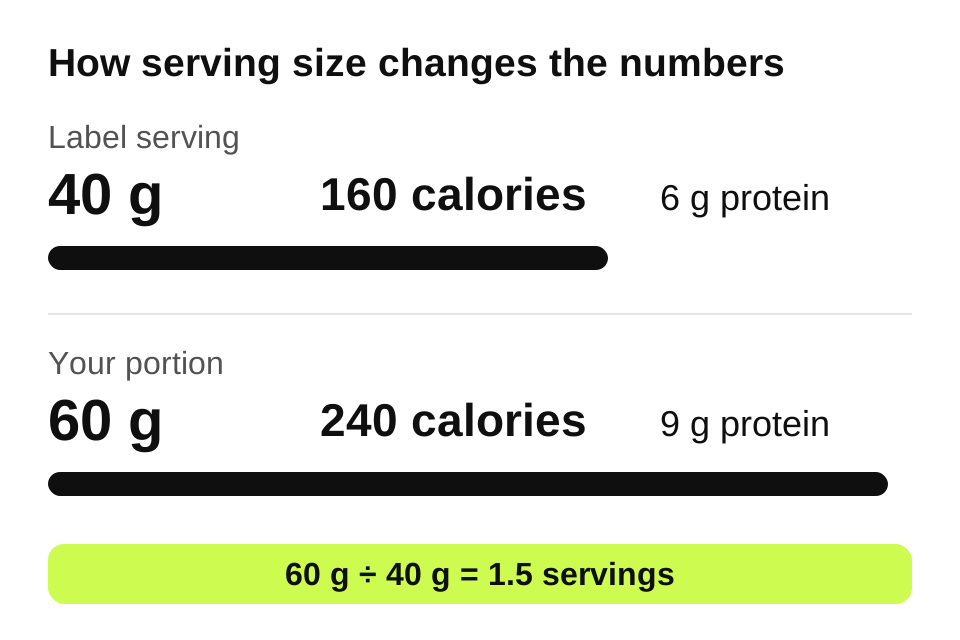
If you accept the default serving, you leave 80 calories out of your log even though the scanner found the correct cereal. Enter 60 g or 1.5 servings, then log any milk separately.
Barcode scanning for Indian groceries and home cooking
For Indian packaged foods, choose an app by testing your own groceries. A database's total size doesn't tell you whether it contains your usual milk, snacks, atta or protein powder. We haven't tested a representative set of Indian products, so we can't rank these apps by regional coverage.
If a product is missing, create a custom food from its nutrition panel. Check whether the panel gives values per serving or per 100 g, and use the matching unit in the app. Save it under a name you'll recognize next time.
For homemade dal, curry or rice dishes, a saved recipe is more useful than a barcode. Record the ingredients, including cooking oil, and divide the batch into portions. A photo can help identify the foods, but you still need to review the ingredients and quantities it suggests.
What to check before choosing an app
Try the free plan with a normal day's meals. Include a packaged food, a food without a barcode and a meal you cook often. Check whether you can correct an entry, change its weight and reuse it the next day.
Also check the features you'll use after logging: daily protein totals, saved recipes and access to past meals. Scanner access, report history and custom-food limits are separate features. A plan can be generous in one area and restrictive in another.
Once you've chosen a tracker, set calorie and protein targets you can review against your progress. Our guides to calorie targets for weight loss and protein for muscle growth explain where to start.